
By Rajib Lochan Huzuri
In more than 25 years of sitting in discovery sessions, inside mid-market manufacturing plants, sprawling distribution centres, you name it, I’ve heard some version of this sentence more times than I can count:
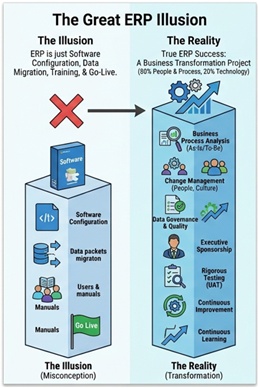
"We've bought Microsoft Dynamics 365 Business Central. Now we just need you to configure the modules, move our data, train the team, and flip the switch."
It sounds reasonable enough. Buy a world-class business application, and surely the hard part is just the technical setup, right?
Wrong. That belief is probably the single most dangerous misconception a business leader can carry into an ERP implementation.
When a project blows through its budget, misses deadlines, or causes serious disruption after go-live, it’s almost never because the software itself broke down. Microsoft Dynamics 365 Business Central is a genuinely capable platform, it can handle everything from complex multi-entity financial consolidations to advanced warehouse management and finite-capacity manufacturing scheduling.
When projects fall apart, it’s because leadership treated an ERP implementation like a software installation, when it’s really a fundamental business transformation project.
1. The Real Anatomy of an ERP Project
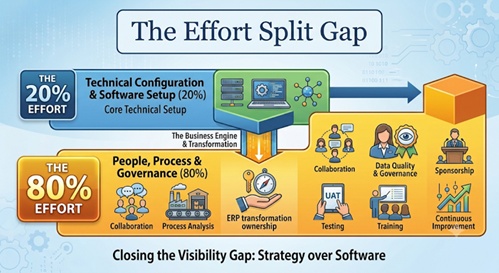
If software configuration really were the hardest part of a Business Central implementation, my job as an ERP consultant would be easy. In reality, standing up the environment, tuning the core system parameters, and mapping the chart of accounts, that’s roughly 20% of what it takes to succeed.
So, what’s the other 80%? That’s where the real work happens in the messy, human, cross-functional reality of how your company operates, decides, and evolves.
Think of an ERP system as a mirror held up to your organization. If your current processes are fragmented, overly manual, or poorly understood, a standard software configuration will simply automate those inefficiencies, letting you make the same mistakes as before, only faster and at a much bigger scale.
Even great software can’t rescue broken, poorly designed processes, and it can’t make up for a lack of internal discipline. Success comes down to carefully aligning three things, People, Process, and Technology. Focus only on the technology, and the whole structure collapses under the weight of operational reality.
2. Dismantling the Top 5 Customer Misconceptions
To understand why an ERP transformation calls for a different approach altogether, it helps to look at the myths that keep derailing mid-market and enterprise projects alike.
Myth 1 “We should just replicate our old processes in Business Central.”
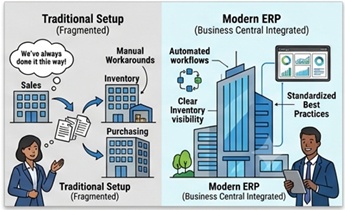
This is the “we’ve always done it this way” trap. If your legacy system had customer service printing a picking list, walking it to the warehouse, and typing a tracking number into an Excel sheet by hand, why would you spend money building custom code to recreate that exact workflow in a modern cloud system?
A good Business Central consultant brings industry-standard best practices to the table. The goal should be standardizing your processes, leaning on out-of-the-box features like native Microsoft 365 integrations and built-in approval workflows, rather than twisting the software to fit old habits through unnecessary customization.
Myth 2 “Data migration is a simple weekend IT task.”
Plenty of leaders assume moving data from an old system into Business Central is basically just extract-and-load. In reality, it’s a serious data governance and data quality challenge.
If your master data, customer records, vendor files, inventory items, is full of duplicates, missing fields, or outdated pricing, moving it into a new system doesn’t fix any of that. Garbage in, garbage out. Cleaning, transforming, and validating master data takes weeks of dedicated work from the business side, well before the final cutover weekend.
Myth 3 “ERP implementations can be completely delegated to IT.”
When executives view an ERP project purely as an IT matter, they naturally hand the keys to the IT Manager. That’s a critical mistake.
Your IT team is essential for infrastructure, security, integrations, and Azure fundamentals. But they don’t own the day-to-day profit margins on your manufacturing floor, the procurement strategy for your supply chain, or the revenue recognition policies in finance. This has to be a business-driven initiative, led by the operational people who live in these processes every day.
Myth 4 “Our users will naturally adapt once the system is live.”
This ignores basic human nature. People like their familiar, if broken, routines, because they already know the workarounds.
Without a deliberate strategy for ERP change management, you’ll run into passive resistance, shadow IT (think offline spreadsheets making a comeback), and sagging morale. User adoption comes from early engagement, honest communication, and ongoing coaching, not from handing someone a manual two weeks before go-live.
Myth 5 “Go-live marks the official end of the project.”
Flipping the switch on day one isn’t the finish line, it’s the end of the first chapter.
Organizations typically go through a stabilization period, needing intensive hypercare support to smooth out user friction and data edge cases. The real value shows up in the months and years after go-live, through ongoing business process improvement, advanced Power BI reporting, and tools like Microsoft Copilot and the Power Platform.
3. Real-World Transformation: Redesign vs. Configuration
To see how this plays out, let’s look at two examples where rethinking the business process mattered far more than the technical configuration.
The Wholesale Distribution Bottleneck
A mid-sized wholesale distributor was dealing with serious order fulfilment delays. Their first instinct was to ask us to heavily customize Business Central’s sales order entry screen so customer service reps could manually override inventory allocations on the fly.
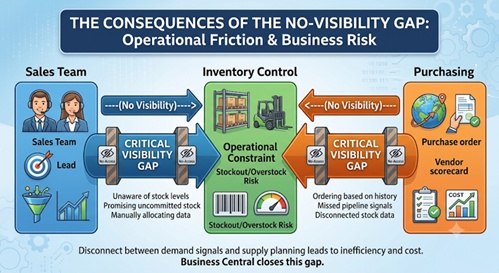
Instead of jumping straight into code, we did a thorough “as-is” process analysis. The real bottleneck turned out to be those sales, purchasing, and warehouse teams were working in complete isolation. Sales reps kept promising inventory that was already committed to long-term contracts, while purchasing was ordering stock based on historical patterns instead of real-time sales activity.
Rather than layering on brittle, custom code, we redesigned the core process to take advantage of Business Central’s native supply chain intelligence:
- We put standard Available-to-Promise (ATP) logic in place, giving sales reps accurate, real-time visibility into inventory during the quoting stage.
- We set up automated approval workflows for high-value order overrides, cutting out the chaotic manual back-and-forth.
- We connected demand forecasting directly to procurement using the system’s native planning worksheets.
By fixing the process problems first and trusting the software’s standard design, the distributor cut order processing cycle times by 35%, without writing a single line of custom AL extension code.
The Construction & Professional Services Real-Time Variance
A large mechanical contractor wanted to use the Jobs/Projects module in Business Central to track labour and material costs. Under their old approach, field engineers submitted handwritten weekly timecards, which an administrative assistant manually rolled up into an Excel sheet at month’s end before posting to accounting. Leadership was making major project decisions based on financial data that was already 30 to 45 days stale.
Technically, setting up project tasks in Business Central is straightforward. The real transformation was in shifting the company’s entire relationship with data.
We ran cross-functional workshops to build a structured, future-state process:
- Field staff got a mobile-friendly Power Apps interface tied directly to Business Central, so they could log labour daily, right from the job site.
- We put a hard company-wide deadline on weekly timesheet approvals, making project managers directly responsible.
- We fed all of this into live Power BI dashboards, giving executives real-time visibility into cost-to-complete variances.
The project’s success didn’t come from how the ledger accounts were configured. It came from fundamentally changing how field data was captured, owned, and used across the business.
4. The Diverse Skillsets Required for ERP Transformation
Because an ERP project touches every corner of an organization, pulling it off well takes a mix of functional, technical, and strategic skills. You can’t expect a handful of software configurators to carry an entire enterprise transformation.
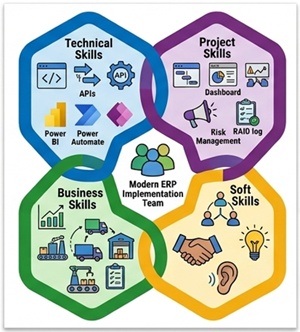
A genuinely successful implementation team brings together four distinct skill areas:
| Skill Pillar | Key Core Competencies | Real-World Application in a Project |
|---|---|---|
| Business & Strategy | Process analysis, financial acumen, supply chain expertise, risk management, strategic thinking. | Making sure the system design directly supports the company's long-term commercial goals and margin targets. |
| Project & Execution | Scope management, stakeholder alignment, workshop facilitation, RAID logs, requirement traceability matrices. | Keeping the timeline on track, managing scope creep, and driving clear decision-making. |
| Technical Architecture | Functional consulting, AL development, integration architecture, Power Platform, API design, Azure. | Building a scalable, high-performing cloud ecosystem that connects smoothly with other business tools. |
| Soft Skills & Leadership | Active listening, empathetic negotiation, coaching, conflict resolution, critical thinking. | Managing the natural friction and politics that surface when deeply ingrained workflows change. |
5. A Blueprint for a Disciplined Implementation
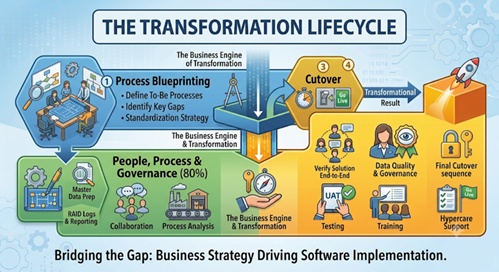
If you want your Business Central investment to pay off long-term, you need an implementation strategy built on business discipline, not technical shortcuts. A proven, resilient transformation lifecycle moves through a clear progression:
Phase 1 Process Blueprinting
Before anyone touches a Business Central sandbox, map out your current (“as-is”) operational flows and design your future (“to-be”) standardized processes.
Use visual tools like Visio, Lucidchart to walk through every operational scenario. Pin down exactly where handoffs break down, where data silos exist, and how standard Business Central functionality can close those gaps without resorting to heavy custom code.
Phase 2 Governance, Data & Rigorous Preparation
Set up a strong, centralized project office backed by real execution frameworks, Azure DevOps, or Microsoft Project. Track project health closely with real-time RAID logs (Risks, Assumptions, Issues, Dependencies) and a clear requirements traceability matrix.
At the same time, kick off your master data cleanup. Build out your security profiles, design your permission sets, and lay out your core reporting architecture early, so your underlying data can cleanly feed your Power BI dashboards.
Phase 3 Structural Testing & Real-World UAT
Don’t treat User Acceptance Testing as a casual walkthrough of new screens. UAT is a formal, high-stakes phase where your actual business users run real, end-to-end scenarios using detailed test scripts.
Test the system under true operational conditions, all external API integrations, document layouts, and approval matrices included. Users should only sign off once they can confidently complete a full daily workflow start to finish, without a consultant standing by.
Phase 4 Cutover Management & Ongoing Continuous Improvement
A successful transition relies on a minute-by-minute cutover plan that spells out every technical step, data reconciliation point, and human milestone for launch weekend.
Once you’re live, move your team straight into intensive hypercare support to keep things stable. As the organization settles in over the following months, shift your focus to continuous optimization, expanding Microsoft 365 integrations, growing your Power Platform automated flows, and bringing in native Copilot AI capabilities to drive deeper productivity across the business.
The Strategic Takeaway
Buying Microsoft Dynamics 365 Business Central gets your organization a genuinely world-class, modern digital engine. But owning a high-performance engine doesn’t guarantee you’ll win the race. How you build the chassis, refine your operational processes, train your drivers, and set your driving rules determines whether you cross the finish line, or spin out on the first turn.
ERP implementation success isn’t an IT milestone you check off a list. It’s a disciplined exercise in organizational clarity, deliberate change management, and executive leadership.
When you start viewing your ERP project as a strategic business transformation rather than a simple software install, you stop managing an expensive technology headache, and start building a scalable, competitive digital platform that can fuel your company’s growth for decades to come.
Are you currently planning or navigating a Microsoft Dynamics 365 Business Central implementation within your organization? Let’s connect to talk about how to align your people and operational processes for a truly successful, business-first digital transformation.